Script contract¶
Built, not released
CAPIE 1.1 and the script SDK implement everything on this page (API level 2), and offline
tests cover the native side. The SDK's demo mod ran in the game on CAPIE 1.1. Rows marked
needs in-game test are the open checks. CAPIE 1.2
(API level 4) adds the name layers. The full, versioned text is
plugin/capie/CONTRACT.md in the repository.
How it works¶
The contract is variant B: plain HOI4 script, nothing the game's parser does not already know. You name your editor GUI after a fixed grammar. When the player clicks Apply, CAPIE copies the typed text into temporary variables of that player's own command. Your effect then calls the SDK, which reads the variables, checks them and calls the game's own setters.
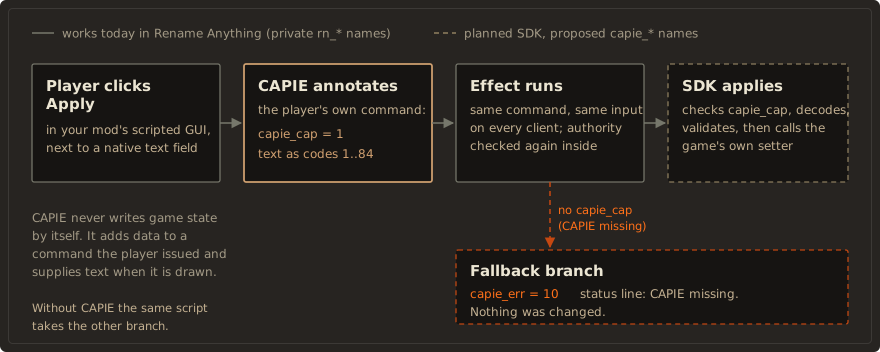
- A mod built this way loads without errors when CAPIE is missing, after a game patch, or on a machine that never had CAPIE.
- In multiplayer the branch input travels inside the command, so every client should take the same branch. That is the design; it has not been tested with two players.
- The contract does not depend on the game build. After a patch your mod needs no update while CAPIE catches up; it shows "CAPIE missing" in the meantime.
Versions¶
| Number | Value | Where you read it |
|---|---|---|
| API level | 4 in CAPIE 1.2 (2 in 1.1) |
temp_var:capie_cap in the command, localisation key CAPIE_API |
| Release | 1.2.0 (1.1.0) |
localisation key CAPIE_BUILD |
| Build number | 10200 (10100) |
temp_var:capie_ver (used by the multiplayer check) |
Require an API level (capie_min_api), never a release. See
Versions and fallback.
Editor names¶
CAPIE recognises your editor by its names alone. It parses them exactly; there is no substring search and no registration file.
id                 [a-z0-9]{1,12}                         mod id and editor id
scripted GUI       capie_v1_ed__<mod>__<editor>           the key in common/scripted_guis
Apply effect       capie_v1_ed__<mod>__<editor>_apply_click
                   (button capie_v1_ed__<mod>__<editor>_apply)
edit box n         capie_v1_f__<mod>__<editor>__<n>       n = 1..4, consecutive from 1
prefill carrier n  capie_v1_pf__<mod>__<editor>__<n>      instantTextBox, optional
epoch carrier      capie_v1_ep__<mod>__<editor>           instantTextBox, required
- Upper case, underscores inside an id, a third
__part or a 13th character make the name something else, and CAPIE leaves the window alone. - Up to 32 editors per game session and 8 per mod id, first come first served. When the limit is
reached, Apply still reaches your effect with sentinel
-2, so you can tell the player. - The mod id
capiebelongs to the SDK. - Other buttons of the window (Open, Cancel, anything else) run as plain script.
These names are the one exception to the reserved capie_ prefix: they are yours, and their
shape is how CAPIE finds them.
Building an editor walks through a complete example.
The epoch¶
The epoch carrier is a hidden text box that shows a positive whole number your mod stores, for
example [?ROOT.mymod_epoch|0]. Raise it when the editor opens and after every successful Apply
or Cancel. CAPIE reads it when the window becomes visible (a new value means a new opening),
prefills the fields once per opening, and sends the value with every Apply. The SDK accepts an
Apply only when that value equals the stored one, so a double click or Enter plus a click cannot
apply twice.
What CAPIE adds to the Apply command¶
| Record | Value |
|---|---|
capie_cap |
API level, 4 in CAPIE 1.2 |
capie_ver |
build number, 10200 in CAPIE 1.2 |
capie_epoch |
the epoch read from the carrier, or -code (below) |
capie_nf |
number of fields, 0 to 4 |
capie_f<n>_err |
0 valid, otherwise a field error (below) |
capie_f<n>_at |
position of the first rejected character, 0 when none |
capie_f<n>_len |
number of characters, 0 for an invalid field |
capie_f<n>_0 .. capie_f<n>_31 |
character codes, 0 past the length |
Before adding anything, CAPIE removes every incoming record whose name starts with capie_, so a
save or a stale value cannot supply them. That does not stop your own effect from setting
capie_cap; it is a presence signal, not a permission.
When the window is visible but CAPIE cannot send the text, Apply still runs once, carrying only
capie_cap, capie_ver and a negative capie_epoch:
capie_epoch |
Reason |
|---|---|
-1 |
The opening is not ready or changed (first frame after opening, a rebind, a new epoch) |
-2 |
Editor limit of the session reached |
-3 |
Layout invalid: a gap between fields, or a fifth field |
When the window is not visible, CAPIE drops the click.
capie_f<n>_err |
Meaning |
|---|---|
| 1 | empty |
| 2 | more than 32 characters |
| 3 | invalid Unicode |
| 4 | control character |
| 5 | a character with meaning in the game's text: " [ ] \| $ § £ \ { } # @ |
| 6 | outside the alphabet |
CAPIE never trims, normalises or cuts input. An invalid field does not stop the command; the other fields still arrive, and the SDK decides.
The hard rule: where CAPIE data exists¶
Command data exists only inside the command
capie_cap and the typed text are temporary records of one game command. They exist only
while that command's effect runs. In visible and enabled triggers, in on-actions and in
any other effect they are absent.
Use the other detection signals to decide what to show. Use capie_cap,
through capie_v1_begin, to decide what to do.
Rules every effect must follow¶
- Check authority inside the effect. The game runs the effect without repeating the button's
visibleorenabledtriggers, and it does not tell the effect who clicked. See Permissions. - Start with
capie_v1_begin. Never gate on a flag or a variable stored in the save. - On failure, set
capie_err, show a status line, and change nothing. Do not apply half of a multi-field edit. - Never use
career_profile_has_player_flagor any other local-player state inside an effect. Branching on local state in a synchronised effect risks an out-of-sync game.
Alphabet¶
| Codes | Characters |
|---|---|
| 1..84 | a-z, A-Z, 0-9, space, -, ., ', 18 Polish letters (Rename Anything's table, unchanged) |
| 85..92 | , ! ? ( ) & : / |
| 93..152 | Latin-1 letters À..ÿ, without ×, ÷ and the Polish Ó ó already above |
| 153..264 | Latin Extended-A Ā..ſ, without the Polish letters already above |
The table is defined once in the SDK (tools/capie_charset.py); a build check proves the native
encoder holds the same list.
Use a font that draws every character for edit boxes and for text that shows typed names:
hoi_16mbs, hoi_18mbs, hoi_18, hoi_20b, hoi_20bs, hoi_26mbs, hoi_16typewriter,
hoi_22typewriter, Arial12, hoi_16tooltip3, hoi_33, cg_16b, cg_18b. The garamond_*,
vic_* and hoi_18b fonts have no Latin Extended-A, which includes the Polish letters.
Typing these characters, including through dead keys, and drawing them in names is needs in-game test. Cyrillic is not supported: the main fonts have no Cyrillic glyphs, and the game switches to separate fonts only for the Russian language.
Rename Anything's private names¶
Rename Anything keeps its own names in CAPIE 1.1 (rn_ip_* editors, rn_native* records,
RN_PLUGIN_STATUS, the 84-code alphabet). CAPIE recognises them exactly as before and adds no
capie_* record to them. Its editors use behaviour the public contract does not offer yet, such
as the refresh of the Politics panel after Apply. The move onto the grammar is planned for the
next tested release and described in the SDK's MIGRATION.md.
Highlighting in these docs¶
HOI4 script has no stock lexer in Pygments, the highlighter Zensical uses. The code on this site
is coloured by a small local lexer (pygments-paradox-script in the repository's
sites/shared/) that knows Clausewitz blocks, operators, dates, yes/no, scope prefixes such
as temp_var: and the reserved capie_ prefix. Use the fence names paradox for script and
paradox-loc for localisation if you copy the setup.