Safety
CAPIE runs native code inside the game, so you should know exactly what it does and what it refuses to do. This page lists the rules. Each rule says whether it holds for today's development builds or describes the plan.
Original game files stay unchanged
CAPIE never modifies hoi4.exe, steam_api64.dll or any other game file. The CAPIE launcher,
the loading method chosen for release, adds no file to the game folder at all.
The proxy alternative adds one version.dll to the game folder. The installer refuses an
existing foreign version.dll, and uninstall removes only a file whose recorded path and
verified release hash still match.
Both loading methods open
hoi4.exe read-only to check its hash. Runtime files and diagnostics live under
%LOCALAPPDATA%\RenameAnything; Steam options and shortcuts are changed only when requested.
Config activation remains enabled until its marker is removed; removing -capie alone only
disables flag activation.
No network Works today
The CAPIE runtime and proxy open no network connections. The launcher does nothing in the background.
The only part that goes online is the installer script, and only when you run it with
-Install, -CheckUpdate or -Update. It sends no identifiers and no telemetry. A planned
multiplayer check would travel inside ordinary game commands, never over a connection CAPIE
opens itself.
Pinned to exact game builds Works today
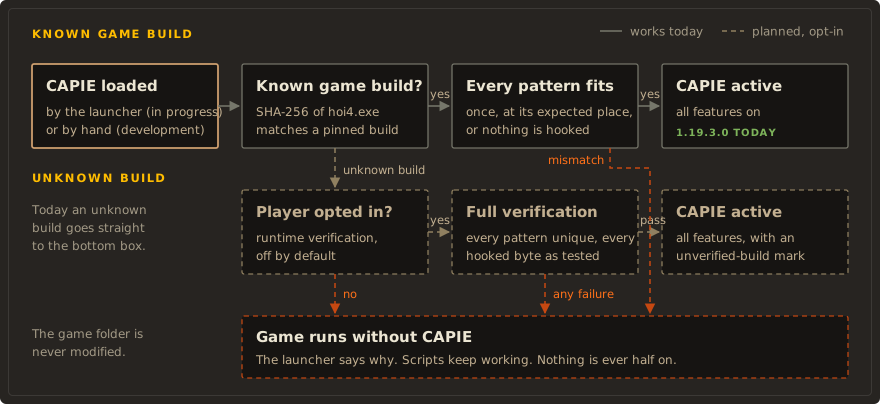
CAPIE starts only on a game build it knows:
- It computes the SHA-256 of the running
hoi4.exeand compares it with the pinned value for HOI4 1.19.3.0. A different hash stops it with error code 10. - Every code pattern it needs must match exactly once, at the expected address. One mismatch stops it with error code 20, before any hook is switched on.
- Only then does it hook. Each hook forwards to the game's original code exactly once.
The launcher adds its own pin: it checks the game's hash and the SHA-256 of every file in its bundle, and keeps those files open read-only while it uses them.
Fails closed Works today
When something is wrong, CAPIE does nothing and the game keeps its own behaviour:
- An unknown game build or a pattern that does not match: CAPIE stays off.
- Text that is empty, longer than 32 characters, or contains characters the game cannot show: rejected with an error line, never shortened or "fixed". Nothing changes.
- Any lookup CAPIE does not recognise exactly goes to the game unchanged.
The script side follows the same rule. A mod built on CAPIE checks for CAPIE inside every effect that needs it and takes a visible fallback branch when CAPIE is missing.
Unknown game builds: opt-in verification Planned
By default an unknown game build means no CAPIE: the launcher starts the game without it and tells you why. Players asked for a way to keep playing after a patch that did not touch the code CAPIE uses, so an opt-in mode is planned:
- It is off by default. You turn it on yourself.
- On an unknown build, CAPIE scans the running game for every pattern it needs, including the structure offsets read from code.
- It switches on only if every pattern is found exactly once and every hooked byte is identical to the tested build. If even one check fails, CAPIE stays off and the game runs without it. There is no partial mode.
- While it runs on an unverified build, the game shows a small, discreet mark.
Game updates explains the normal release path for new game builds.
Signed releases and virus scans Planned
- Every release ships a release manifest that lists the SHA-256 of each file and the game builds it supports. The manifest is signed (RSA 2048 or more, SHA-256); the public key is pinned in the installer script, and the private key stays offline.
- Every published binary (launcher, DLL, injector) is scanned on VirusTotal before release, and the result links go into the release notes. Upload to VirusTotal makes a file public, so it is done only for final release files.
- Before that, each candidate build is scanned locally with Windows Defender
(
MpCmdRun -Scan -ScanType 3). The development builds checked on 2026-10-11 came back with "found no threats". That is one engine, not a VirusTotal result.
There is no release yet, so there are no VirusTotal links yet.
Open source
You can read and build everything. The intended license is MIT; until a LICENSE file is added,
all rights are reserved. CAPIE uses MinHook by Tsuda
Kageyu under the BSD 2-Clause license.
What CAPIE cannot promise
- Achievements: any mod that changes files under
common/changes the game's checksum, and achievements need an unmodified checksum. That is a game rule, not a CAPIE rule. - Antivirus warnings: CAPIE loads itself into another process, which some malware also does, so heuristic warnings are possible. The scans above and the source code are the answer.
- Multiplayer: never tested with two players. See Multiplayer.