Multiplayer
Not supported
CAPIE has never been tested with two players. Do not use it in multiplayer. Switch CAPIE
off before you join or host a multiplayer game: disable the CAPIE mod in your playset once
that switch ships, or remove the CAPIE launch option (install.ps1 -RemoveSteamLaunchOption,
or by hand in Steam).
Two game instances cannot run on one desktop: the game checks for an existing window at start-up and exits. A real test needs a second machine, and that test has not happened yet.
What is known
From reading the game's code and from single-player runs:
- When a player clicks a scripted GUI button, the game writes the command into a byte stream and creates a fresh copy from it before running it. In single player the records CAPIE adds to a command survived that round trip intact. A network game sends the same byte stream, so every client should receive the same records whether or not it runs CAPIE. That is a strong expectation, not a two-machine result.
- The game runs a command's effect without checking who sent it and without repeating the
button's
visibleandenabledtriggers. Every rule about who may do what must be checked inside the effect itself. See Permissions. - Each client draws country names from its own CAPIE. A client without CAPIE sees the game's name. The name layer itself is ordinary country variables, synchronised like any other. If any game code stored a drawn name into game state, clients could diverge; no such code was found, but it was not ruled out either. So all players need the same CAPIE version.
- CAPIE must never change game state on one machine outside a command to "fix" a mismatch. That would itself cause an out-of-sync game.
The version check in script In progress
Built in the SDK; it needs a test on two machines.
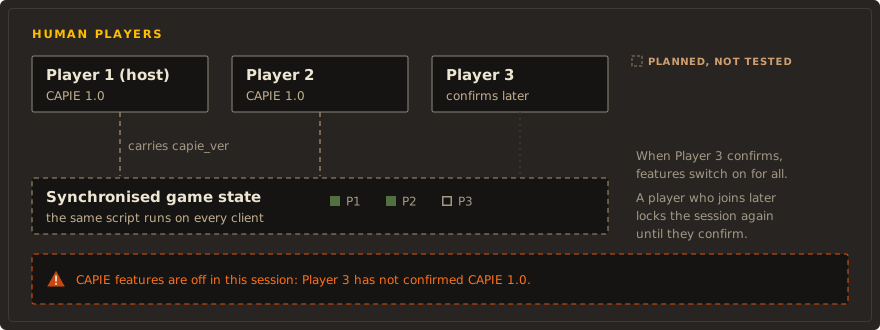
CAPIE does not kick anyone and does not touch the network. Instead, every CAPIE feature built on the SDK stays off for everyone until every human player has shown the same CAPIE build, and a banner says so.
- Every Apply of a grammar editor carries the build number
capie_ver(10100for CAPIE 1.1.0), next tocapie_cap. capie_v1_beginruns on every client and stores that number on the issuing player's country (capie_v1_ver, flagcapie_v1_seen). A command withoutcapie_capclears both.- It then recomputes the global flag
capie_v1_mp_ok: set when every country withis_ai = noreports the same number as the issuing player.global.capie_v1_mp_missingcounts the ones that do not. - In multiplayer (more than one human country) an SDK Apply without
capie_v1_mp_okfails withcapie_err = 16and changes nothing. In single player the check passes as soon as the player has CAPIE. - The SDK's CAPIE check window (
capie_v1_ed__capie__hello, a grammar editor without fields) appears while the flag is unset. Each player presses its button once per session; the click counts even when the window is not ready, because every annotated command carriescapie_capandcapie_ver.
capie_v1_mp_recompute = {
    set_temp_variable = { capie_v = temp_var:capie_ver }
    set_global_flag = capie_v1_mp_ok
    set_variable = { global.capie_v1_mp_missing = 0 }
    every_country = {
        limit = {
            is_ai = no
            OR = {
                NOT = { has_country_flag = capie_v1_seen }
                NOT = { check_variable = { capie_v1_ver = temp_var:capie_v } }
            }
        }
        clr_global_flag = capie_v1_mp_ok
        add_to_variable = { global.capie_v1_mp_missing = 1 }
    }
}
Limits of this design:
- A player is detected only after they issued at least one CAPIE command, so each player first presses the CAPIE check button or applies an editor. An automatic check without a click would require CAPIE to send a command on its own, which is a new and riskier path that is not planned without a separate review.
- A player who joins later controls a human country without a stored version, so the session locks again until they confirm. A version stored in the save by a player who later joins without CAPIE stays until that player presses the button or applies an editor. A player who leaves hands the country back to the AI, which drops out of the check. Both behaviours are expected, not tested.
- It cannot refuse or kick a player. That would take code at the network level, which CAPIE does not have and will not add. The original request to reject players without CAPIE was replaced by this lock and banner.
Host and overlord permissions
Who may rename what in multiplayer, including the host's lobby game rule and the overlord of a player subject, is on the Permissions page.